In the past, managing heavy machinery was straightforward in theory. You tracked machine hours, inspected hydraulic systems manually, and logged maintenance on paper. Repairs were reactive, downtime was unavoidable, and tracking warranty or service claims often felt like a full-time job.
Today, things have changed. Modern equipment, from tractors and harvesters to excavators, forklifts, and mining trucks, comes with built-in sensors, telematics, and diagnostic tools. Machines can monitor themselves, send alerts, and even communicate directly with OEMs.
The challenge is that most operations have not caught up. Your machines are smart, but your systems often are not. That gap is more than inconvenient. It is costly, inefficient, and frustrating for everyone involved.
Why OEM integration matters
Sharing data is no longer optional. OEMs, dealers, rental companies, and fleet operators need to stay aligned on equipment, servicing, parts, and ultimately customers. Without integration, teams operate in silos. Machines alert the OEM. Technicians scramble manually. Parts are not prepped. Downtime increases.
With OEM integration, your systems connect to a wider ecosystem. Real-time diagnostics allow for early problem detection. Maintenance schedules become predictive rather than reactive. Warranty eligibility is verified automatically. Spare parts are prepped and reserved. Data from operations, service, and OEM platforms flows into a single source of truth.
Good integrations drive efficiency, reduce costs, and improve the end-customer experience. At Annata, we focus on simplifying this complexity so businesses can focus on performance instead of firefighting system issues.
The cost of disconnected operations
Let’s compare what operations look like with and without OEM integration.
Scenario 1: Construction Fleet
Without integration, an excavator develops a hydraulic issue. The operator reports it manually. The fleet manager checks logs, calls the service provider, verifies warranty, and schedules a repair. The machine sits idle for days, costing thousands in lost productivity.
With OEM integration, the same hydraulic issue is flagged instantly through the OEM platform. A365 receives the alert, schedules maintenance proactively, confirms warranty automatically, and allocates parts immediately. Downtime is minimized and operations continue almost uninterrupted.
Scenario 2: Agricultural Machinery
Without integration, a combine harvester triggers a sensor alert but the system does not capture it in real-time. Maintenance is reactive. Spare parts must be located manually, delaying harvest.
With integration, the alert reaches your system immediately. A proactive maintenance workflow is triggered. Parts are reserved and technicians are assigned. The harvester is back in action on schedule, preventing crop loss.
Scenario 3: Mining Equipment
Without integration, a haul truck engine overheats. Operators notice the problem and report it after performance has already dropped. Repairs are scheduled manually, and production stalls.
With integration, real-time data from OEM telematics flags the engine issue. Maintenance is scheduled during planned downtime and operators are notified. Production continues with minimal disruption.
The difference is clear. Connected systems transform operations from reactive firefighting into proactive, optimized management.
Challenges of integrating with OEM platforms
Integrations are complex, expensive, and time-consuming. Each OEM has slightly different technical specifications, documentation, and data protocols. Legacy approaches, like point-to-point connections or custom scripts, are costly to build and prone to breaking when standards change.
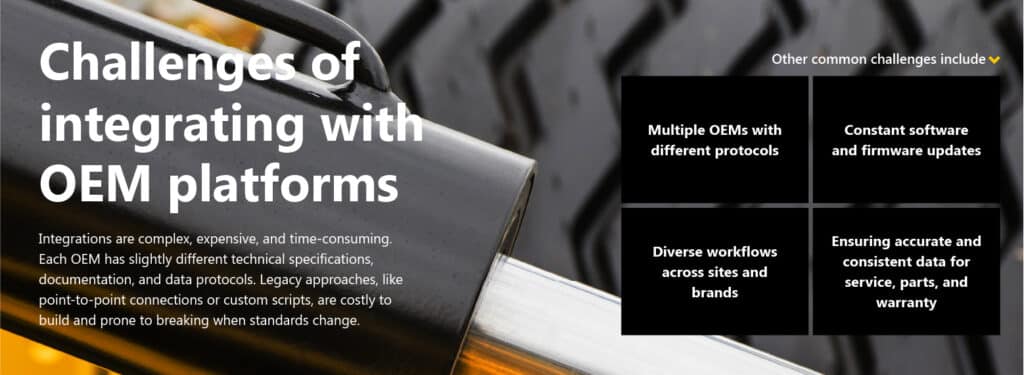
Without a structured approach, OEM integrations can quickly become resource-heavy and risky projects.
How A365 simplifies OEM integrations
Annata takes a different approach. With A365, OEM integrations are standardized, modular, and reusable. Businesses do not have to start from scratch for every new platform or update.

Requirement analysis
We begin by identifying the key integration points and system needs, making sure every workflow, from diagnostics to warranty, is captured.
Architecture and planning
We design a blueprint showing how the integration will connect seamlessly across platforms, while aligning with OEM standards.
Development and testing
Integration components are configured and rigorously tested to ensure compatibility and performance in real-world operations.
Certification
Integrations are aligned with OEM requirements, including collaborative approvals when needed.
Go live
Solutions are deployed smoothly, ensuring minimal disruption to day-to-day operations.
Continuous updates
We provide version upgrades, bug fixes, and ongoing updates to stay aligned with evolving industry standards.
Monitoring and support
Health monitoring and proactive alerts ensure that issues are caught before they impact operations.
Because A365 is built on Microsoft Dynamics 365 and other technologies from the Microsoft ecosystem, including Azure, Copilot, Power Platform, and Dataverse, the integration process is scalable, adaptable, and future-ready. Legacy systems, by contrast, rely on brittle point-to-point connections that are expensive to maintain and prone to breaking.
Modular, adaptable, and future-ready
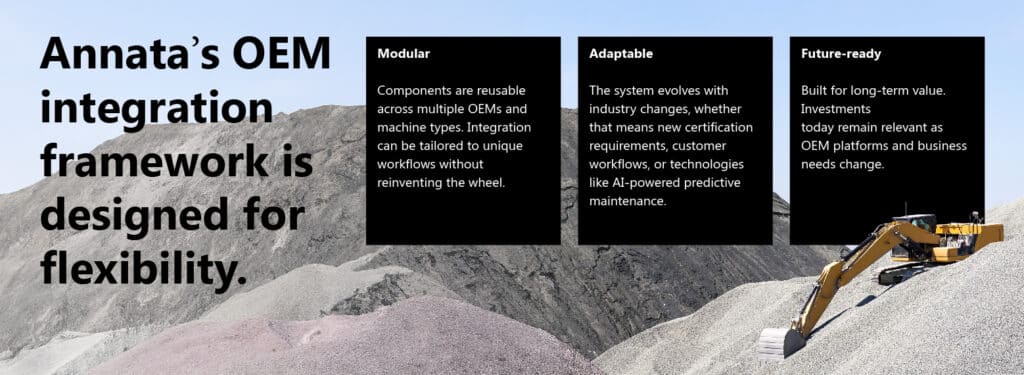
This modular and adaptable design reduces effort, accelerates time to market, and ensures consistency across systems and partners.
Want to see how A365 can optimize your equipment operations? Explore our Digital Experience Center for a free, immersive look.
What connected operations look like

Operations teams spend less time chasing data and more time optimizing productivity.
Comparing operations with and without integration
| Aspect | Without Integration | With A365 Integration |
| Diagnostics | Operators report issues manually | Real-time OEM alerts trigger automatic maintenance |
| Maintenance | Scheduled by hours or generic guidelines | Scheduled based on machine usage, stress, and predictive insights |
| Warranty | Manual claim verification | Instant validation and processing |
| Documentation | Outdated or scattered manuals | Always up-to-date technical bulletins and manuals |
| Data | Spreadsheets and siloed systems | Centralized, real-time, accurate data |
| Downtime | Reactive and unpredictable | Proactive and minimized |
This comparison shows the stark difference between lost hours, frustrated operators, and high repair costs versus smooth operations, optimized uptime, and happier teams.
The competitive advantage
In equipment-heavy industries, OEM integration is no longer a luxury. Operations that remain reactive, disconnected, and reliant on spreadsheets risk downtime, lost revenue, and inefficient workflows.
A365 changes that equation. By providing modular, standardized, and future-ready OEM integrations, it allows equipment businesses to:
- Move from reactive to proactive maintenance
- Reduce downtime and costs
- Streamline warranty and service operations
- Keep data consistent and actionable
- Scale across multiple brands, sites, and equipment types
When machines, teams, and OEMs are fully connected, operational efficiency improves, costs drop, and customer satisfaction rises. That is the power of connected intelligence and the difference Annata brings with A365.
Interested in seeing A365 OEM integration in action? Let’s talk.