A lot of heavy equipment businesses are having the same conversation right now. We know our systems aren’t working the way they should. We know we need to do something about it. But we’re not ready to overhaul everything at once, and we’re not sure we need to.
That’s a completely reasonable place to be. And the good news is you don’t have to choose between starting focused and building something that actually connects your whole operation.
The real question isn’t if a particular ERP for heavy equipment business is right for you. It’s whether the platform underneath your choice was built to support both.
Why ‘modular’ ERP for heavy equipment businesses gets a bad reputation
The word modular gets used in two very different ways in the heavy equipment software market, and the difference between them is what makes this decision straightforward once you understand it.
The version that creates problems is modular by assembly. A business picks tools from different vendors, each solving a specific problem. One for sales, another for service, another for parts or rental. Each does its job in isolation. But they were never designed to share data, and that’s where the friction starts:
- Teams check multiple systems to answer a single customer question
- Data gets re-entered because nothing flows automatically between platforms
- Reporting requires someone to manually pull and combine numbers
- AI tools can’t deliver real intelligence when they’re reading from disconnected sources
- Every new vendor added to the stack creates a new layer of complexity to manage
That’s not a modular problem. That’s a disconnection problem. And it’s exactly what A365 was built to avoid.
The version that works is modular by design. You choose where to start based on where the business needs it most. But everything you activate sits inside the same platform, connected to the same data from day one. When you’re ready to expand, you’re not integrating a new vendor. You’re switching on more of what’s already there.
What A365 modules are available for heavy equipment operations
A365 gives you the choice of where to begin. Whether you want to address one specific part of the operation first or deploy the full platform from the start, every module runs on Microsoft Dynamics 365 with Azure, Copilot, Power Platform, and Dataverse at the core.
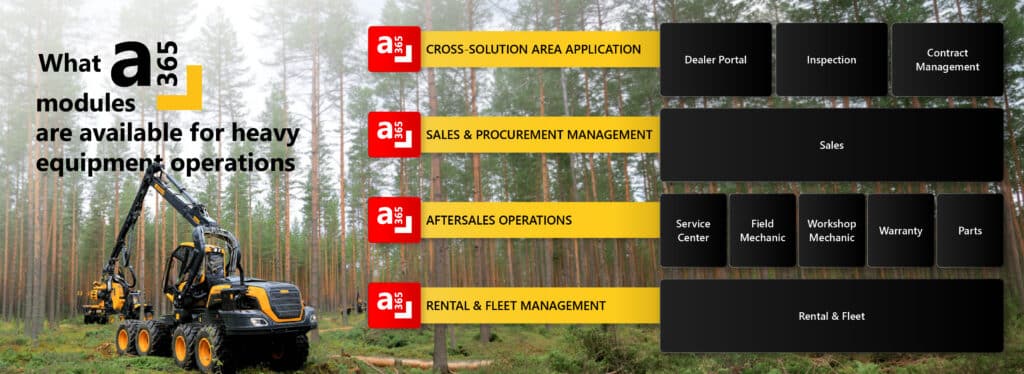
Here’s how the module library breaks down:
Cross-solution capabilities
Beyond the core operational modules, A365 also includes capabilities that connect the whole business:
- Dealer Portal: gives your dealer network real-time access to stock, orders, and service history without the back-and-forth
- Inspection: digital inspection workflows connected directly to service records and customer history
- Contract Management: sales, service, and rental contracts managed in one place across the full operation
Sales and procurement
The Sales module gives your team full pipeline visibility inside CRM. Stock, quotes, and customer data are connected from the first conversation through to close. No switching between systems to answer a customer.
Aftersales operations
This is where most equipment businesses feel the friction most. A365 covers the full aftersales picture:
- Service Center: workshop job management, WIP tracking, and service history in one place
- Field Mechanic: mobile access for technicians working on-site or in the field, with jobs, parts, and customer records on their device
- Workshop Mechanic: technician-level job tracking inside the workshop with real-time updates
- Warranty: claims connected directly to service history and customer records, no chasing data across systems
- Parts: inventory linked to open jobs and service orders so your team always knows what’s available without making calls
Rental and fleet
The Rental and fleet module puts availability, maintenance schedules, and utilization data in one place. Manual boards and availability checks become a thing of the past. When a customer asks if a machine is ready, the answer is there immediately.
Because every module shares the same data layer, adding a new capability doesn’t mean teaching your team a new system. It means giving them more visibility inside the environment they’re already working in.
Modular vs. all-in-one vs. multi-vendor assembly: How they compare
Both paths work. Multi-vendor assembly is where businesses consistently run into trouble.
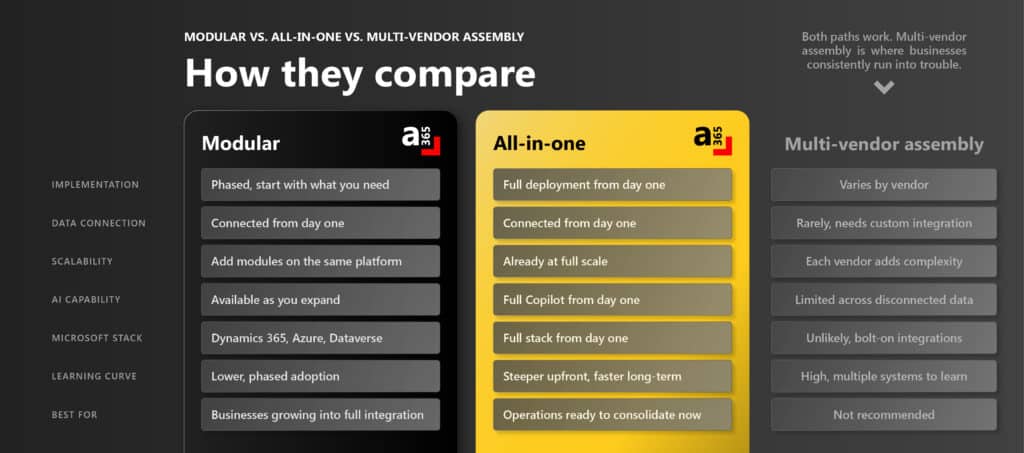
Modular A365
- Implementation: Phased, start with what you need
- Data connection: Connected from day one via Microsoft Dataverse
- Scalability: Add modules on the same platform without rebuilding
- AI capability: Available through Copilot as you expand
- Microsoft stack: Dynamics 365, Azure, Dataverse
- Learning curve: Lower, with phased adoption across the team
- Best for: Businesses growing into full integration
All-in-one A365
- Implementation: Full deployment from day one
- Data connection: Connected from day one across ERP, CRM, and DMS
- Scalability: Already at full scale from the start
- AI capability: Full Microsoft Copilot from day one
- Microsoft stack: Full stack activated immediately
- Learning curve: Steeper upfront, but faster long-term
- Best for: Operations ready to consolidate now
Multi-vendor assembly
- Implementation: Varies by vendor, no consistent approach
- Data connection: Rarely connected, requires costly custom integration
- Scalability: Each vendor added increases complexity
- AI capability: Limited, disconnected data prevents meaningful intelligence
- Microsoft stack: Unlikely, relies on bolt-on integrations
- Learning curve: High, teams work across multiple unfamiliar systems
- Best for: Not recommended
Which ERP for heavy equipment path is right for your equipment business?
There is a lot of conversation around which ERP for heavy equipment path actually fits a business. The honest answer is that both are valid. What matters is the platform underneath them.
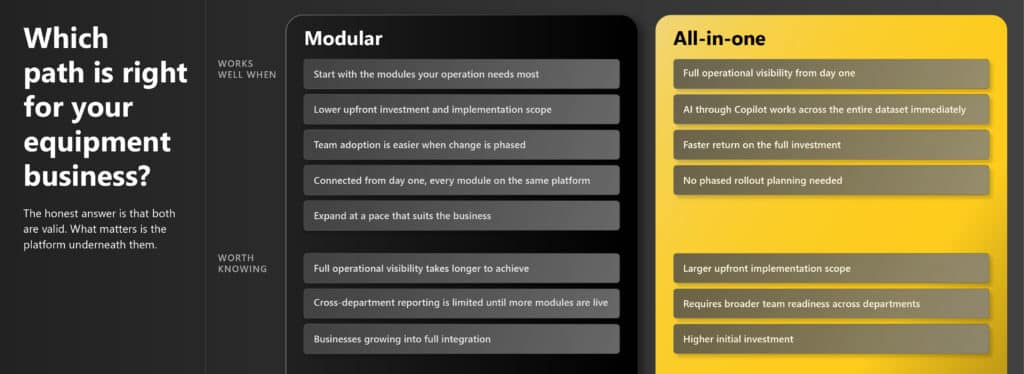
Modular start
Works well when: Your operation wants to start with the modules it needs most, with a lower upfront investment and implementation scope. Team adoption is easier when change is phased, and because every module sits on the same platform, everything is connected from day one. You can expand at a pace that suits the business.
Worth knowing: Full operational visibility takes longer to achieve, and cross-department reporting is limited until more modules are live. A clear expansion roadmap is needed from the start.
All-in-one from day one
Works well when: Your operation is ready for full visibility from day one. AI through Microsoft Copilot works across the entire dataset immediately, the return on the full investment comes faster, and there is no phased rollout planning needed.
Worth knowing: The upfront implementation scope is larger, broader team readiness is required across departments, and the initial investment is higher.
Neither option means starting over later. Because A365 is built on Microsoft Dynamics 365, everything connects from the moment you begin, whether that’s one module or all of them. The platform was designed for both journeys.
Related reading: How A365 brings ERP, CRM, DMS, and AI together for smarter equipment businesses
What disconnected systems actually cost equipment businesses
Whether you’re running one depot or ten, the symptoms of disconnected systems are the same. They just get louder as the business grows.
A customer calls to ask if a machine is available. Sales checks one system. Ops checks another for outstanding maintenance. Someone calls the yard to confirm location. The answer reaches the customer 14 minutes later. The competitor confirmed in 45 seconds.
A service manager starts the day by opening four systems to find open jobs, parts stock, WIP status, and warranty history. Two of those systems need manual updates before the data is even current.
A regional manager asks for a consolidated view across sites. Someone spends half a day pulling numbers into a spreadsheet before the conversation can happen.
None of these are process failures. They’re visibility failures. They don’t get fixed by adding more tools. They get fixed by connecting the ones you have, or replacing the patchwork with a platform that was built to be whole.
What heavy equipment operations look like on a connected platform
When an ERP for heavy equipment businesses, along with a CRM and DMS work as one system, whether you got there in stages or all at once, the difference shows up in how your team works every day.
Your sales team sees live stock availability, customer history, open quotes, and service records in the same place. Pipeline reporting happens in real time, not at the end of the week.
Your service department starts the day with all open WIP on one screen. Parts availability links directly to jobs. Warranty history sits in the customer record. Job status updates automatically.
Your field technicians have everything they need on their device. Job details, parts availability, customer history, and sign-off, without calling back to base.
Your rental and fleet team sees availability, maintenance schedules, and utilization data in one place. No manual boards. No calls to confirm if a machine is ready to go.
Your leadership team sees a real-time view across sales, service, parts, and rental without waiting for someone to pull a report. AI through Microsoft Copilot surfaces insights and flags decisions inside the workflow, not in a separate dashboard nobody checks.
Want to speak to our consultants about which ERP for heavy equipment business is right for you? Get started with a free personalized demo today by dropping us your contact details.
Powering Possibilities starts with a systems that actually talk to each other, whether you build to that point or start there from day one.
Frequently Asked Questions
What is a modular ERP for heavy equipment dealers?
A modular ERP for heavy equipment businesses activate the capabilities they need now and add more over time. A365 offers modular deployment across ERP, CRM, and DMS, all built on Microsoft Dynamics 365, so every module connects to the same data platform from day one through Dataverse and Azure.
What A365 modules are available for heavy equipment businesses?
A365 covers the full operation: Sales, Service Center, Field Mechanic, Workshop Mechanic, Warranty, Parts, Rental and Fleet, Dealer Portal, Inspection, and Contract Management. Each module connects to the same data platform, so you can start where the business needs it most and expand without rebuilding anything.
Can a heavy equipment business start with specific modules and add more later?
Yes. A365 is built for a phased approach. You can activate the modules that address your most urgent operational needs and expand into others as the business grows. Because everything runs on the same Microsoft Azure and Dataverse foundation, nothing needs to be rebuilt when you scale.
What is the difference between modular and all-in-one ERP for heavy equipment businesses?
Modular means starting with specific capabilities and expanding over time. All-in-one means deploying fully connected ERP, CRM, and DMS from day one. A365 supports both on the same platform. The choice is about pace and readiness, not about sacrificing data connection or integration.
What problems do disconnected ERP for heavy equipment businesses cause?
Disconnected systems create manual data re-entry, slow response times to customers, limited reporting visibility, and an inability to use AI effectively. When ERP, CRM, and DMS don’t share data, teams spend time managing systems instead of serving customers.
Is A365 built on Microsoft Dynamics 365?
Yes. A365 is purpose-built on Microsoft Dynamics 365, Azure, Dataverse, Copilot, and Power Platform, designed specifically for automotive, trucks and buses, and heavy equipment industries.