
TL;DR: Most business systems force periodic, disruptive software upgrades that wipe out institutional knowledge and slow operations down. A365, built by Annata on Microsoft Dynamics 365, is evergreen software: it updates continuously with no migration projects, no version overhauls, and no relearning curve. AI is embedded across the full lifecycle, from pre-sales to after-sales to end of life, and the platform runs as one connected system instead of a patchwork of tools.
It’s 6:15 a.m. and the service bay at a heavy truck dealership is already loaded. The shop foreman pulls up the diagnostic history on a bus that came in for a warranty claim, and half the notes from last year’s repair are gone. They’re not deleted, just stranded in a version of the system that got replaced during last quarter’s software upgrade.
Nobody did anything wrong. This is just what happens when software is built to be upgraded instead of built to evolve.
The software upgrade cycle was never built for operations like yours
Automotive, trucks and buses, and equipment businesses don’t run in quarters. They run in decades. A truck sold today might be serviced by three different technicians over fifteen years, at three different locations, under two different ownership groups. The knowledge that keeps that vehicle running, service history, parts compatibility, warranty terms, customer preferences, has to survive all of it.
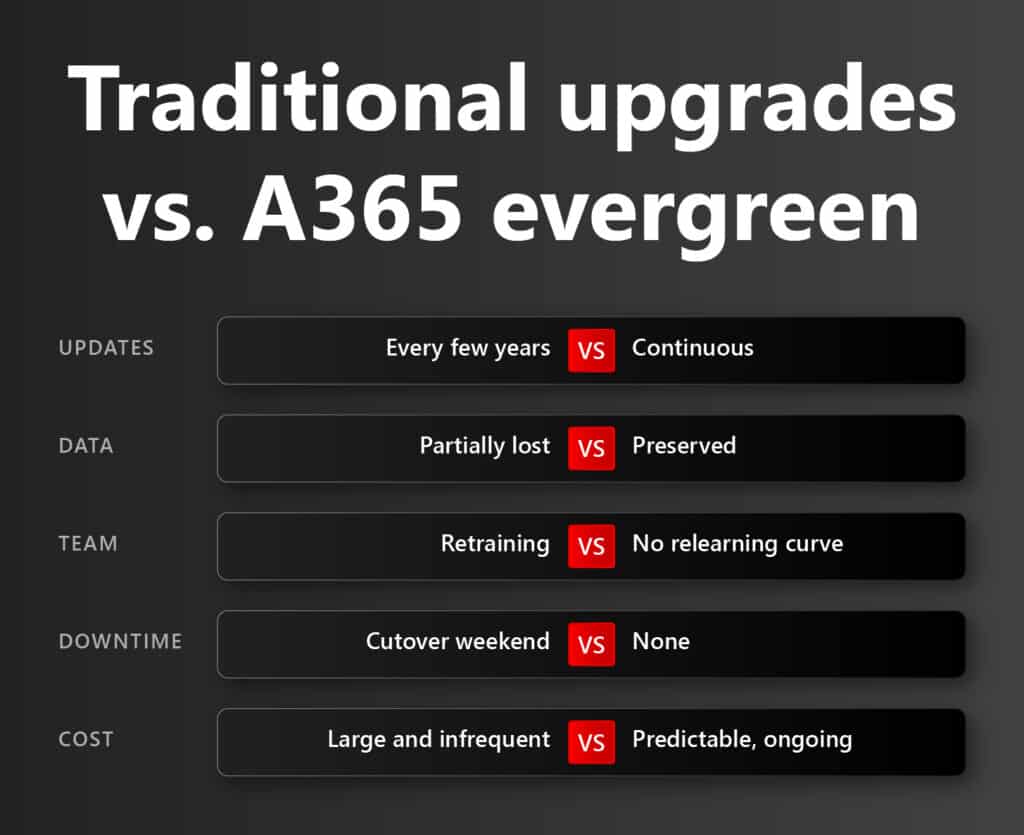
Traditional business systems weren’t built with that timeline in mind. They’re built around the software upgrade cycle: A big release every few years, a migration project, a cutover weekend, and a new baseline everyone has to relearn. Each overhaul creates a gap. Data gets remapped instead of preserved. Custom workflows get rebuilt instead of carried forward. The people who knew where everything lived have to relearn the map.
The real cost isn’t the upgrade project itself. It’s what gets lost in the process: The institutional knowledge that made the old system fast. Every major version swap is a small setback for the business, even when it’s marketed as progress.
Visibility erodes before anyone notices
The impact shows up slowly:
- Parts manager: can’t trust the on-hand count, because half the history migrated and half didn’t
- Service advisor: quotes a job on incomplete records, because old notes sit in an archive nobody can reach
- Regional manager: makes a stocking decision on stale data, because the dashboard is live but not fully current
None of this looks like a crisis in the moment. It looks like friction. But friction compounds. In industries where speed on the shop floor and speed in the back office both matter, a system that overhauls itself every few years is a system that’s always rebuilding trust instead of building on it.
What makes A365 different
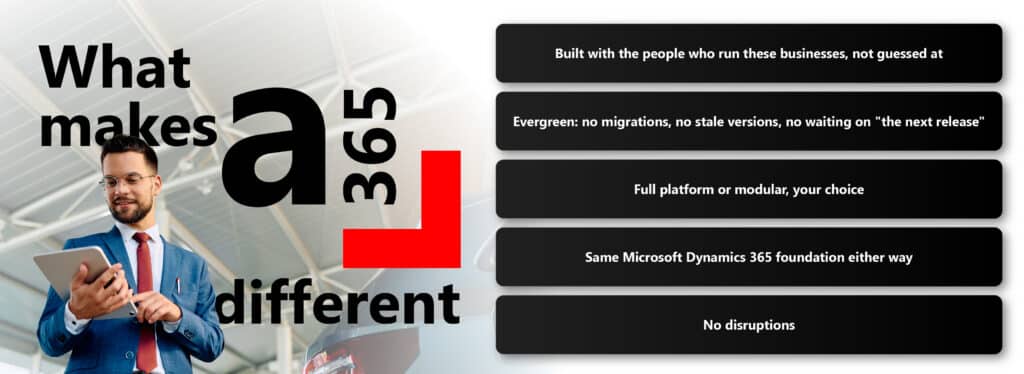
Annata didn’t build A365 by guessing. We sat down with dealers, distributors, importers, service centers, and fleet operators across automotive, trucks and buses, and equipment, and asked what was actually breaking. The same answers kept coming up:
- Too many disconnected systems
- Too much manual work stitching those systems together
- Platforms that needed a full overhaul every few years just to stay current
So we built A365 to update itself. We call it evergreen: No migration projects, no version that goes stale, no waiting for “the next release” to fix what’s broken today. You don’t have to take all of it at once, either.
- Full platform: best if you want sales, service, parts, warranty, and asset tracking connected and live from day one
- Modular: best if you’d rather start with the modules you need now and activate more as you grow
- Both run on the same Microsoft Dynamics 365 foundation
- Both stay evergreen from day one, with no disruption either way
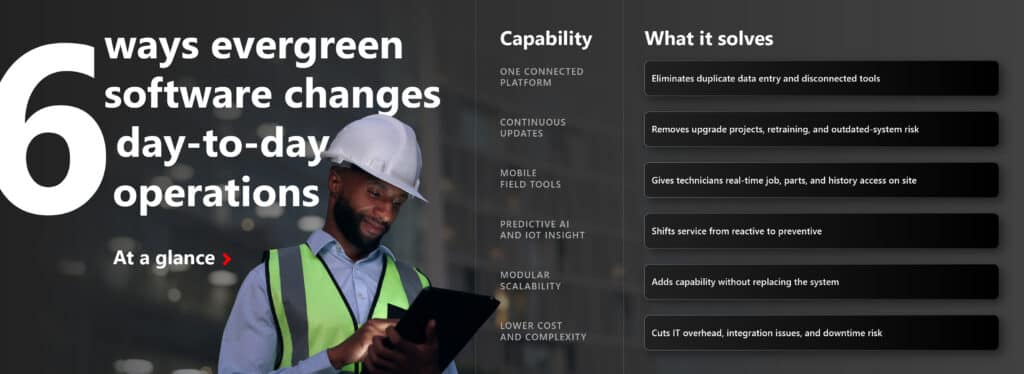
Six ways the A365 evergreen software changes day-to-day operations
At a glance:
- Run your entire business on one platform
No more switching between tools or re-entering the same data into multiple systems. A365 connects sales and rental management, workshop and field service, parts and inventory control, warranty claims and service agreements, and asset tracking and lifecycle analytics. Everyone from sales reps to service techs to executive teams works from the same accurate, real-time data.
- Stay current without disruption
With A365, your system is always up to date. You get monthly enhancements and security patches without a major disruption, which means:
- No costly, time-consuming upgrade projects
- No retraining your workforce on a new version
- No compliance or security risks from outdated software
Your business keeps moving forward without disruption.
- Give your field teams mobile tools built for field operations
Today’s service technicians aren’t tied to the office. They’re out in the field, and they need real-time information in their hands. A365 enables mobile access to assigned jobs and work orders, equipment service history and available parts, digital inspection checklists and image uploads, and instant updates and customer sign-offs. That means faster repairs, better customer service, and fewer return visits.
- Move from reactive service to predictive insight
Reactive service is expensive. A365 helps you shift to a predictive model using Microsoft’s AI tools, sensor data, and machine learning, so you can predict maintenance needs before breakdowns happen, schedule technicians by demand and skill match, monitor machine performance and usage patterns, and automate warranty validation and claims. That’s the difference between fixing problems and preventing them.
- Scale without starting over
Need to expand your rental fleet? Launch a new branch? Add a new equipment line? With A365, scaling doesn’t mean replacing your system. You activate new modules or features as your business grows. The platform adapts with you, without requiring a new implementation.
- Reduce cost and complexity at the same time
Because A365 eliminates the need for large upgrade projects, redundant systems, and manual workarounds, it helps reduce IT maintenance costs, integration issues, time spent on duplicate tasks, and the risk of downtime or system failure. Annata also invests heavily in ongoing innovation, so your business always has access to monthly R&D-driven updates and embedded AI capabilities without reinvesting in a new platform every few years.
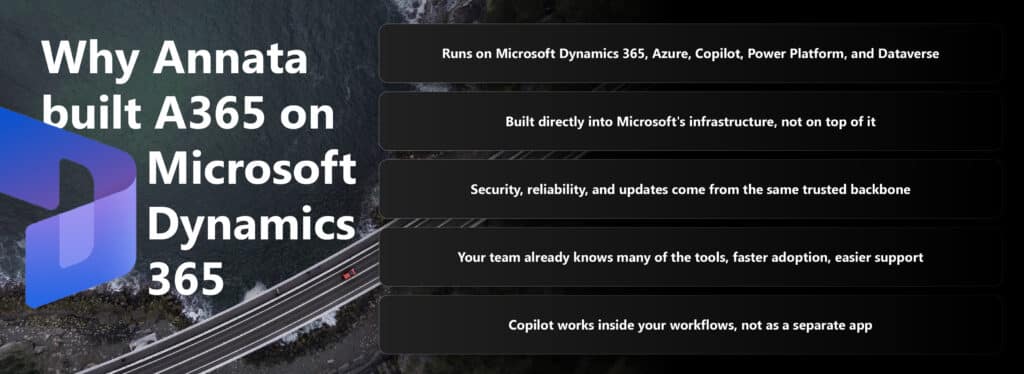
Why Annata built A365 on Microsoft Dynamics 365
A365 runs on Microsoft Dynamics 365, Azure, Copilot, Power Platform, and Dataverse, a foundation that’s already proven at enterprise scale. As a Microsoft ISV, Annata builds directly into Microsoft’s infrastructure, not on top of it, which means security, reliability, and updates all come from the same backbone used by organisations in more than 100 countries.
That also means your team isn’t learning a new system entirely. Many of the tools inside A365 are ones they already use, which makes adoption faster and support easier to find. And because AI is built into that same Microsoft foundation, Copilot capabilities show up inside your actual workflows, not as a separate app you have to remember to open.
What better looks like
Better looks like a service history that’s still whole ten years from now. It looks like a dashboard that reflects reality because nothing had to be remapped to get there. It looks like a team that never has to relearn a system, because the system never asked them to start over in the first place.
Continuity isn’t the absence of change. It’s change that never costs you what came before it. That’s what evergreen means, and it’s why Annata built A365 around it.
See what evergreen looks like for your business
If your team is still absorbing the cost of your last software upgrades, or bracing for the next one, it’s worth seeing what a system that never asks you to start over looks like in practice. Talk to us and find out what the A365 evergreen solution could mean for your operation.
Frequently asked questions
What does “evergreen” mean for A365?
Evergreen means A365 updates continuously in the background instead of through periodic, disruptive version releases. With the A365 evergreen concept, there are no software upgrades, no migration projects, no cutover weekends, and no relearning curve weekend, and no relearning curve for your team.
Does A365 replace your existing Microsoft tools?
No. A365 runs on Microsoft Dynamics 365, Azure, Copilot, Power Platform, and Dataverse, so many of the tools inside it are ones your team already uses, which shortens the adoption curve.
Can we start small with A365 instead of implementing everything at once?
Yes. A365 is available as a full platform for businesses that want everything connected from day one, or modular for businesses that want to add capabilities as they grow. Both options run on the same foundation.
Where does AI show up inside A365?
AI is embedded across the full lifecycle, from pre-sales to after-sales to end of life, so it works inside existing workflows rather than as a separate tool your team has to open.
Who is A365 built for?
A365 is built for automotive, trucks and buses, and equipment businesses, including dealers, distributors, importers, service centers, and fleet operators. A365 is tailored for businesses who don’t want constant software upgrades and are looking for a solution that is evergreen, constantly evolving in the background.